


Shortcut Maker
3.41.55K Reviews
App Specs
- Version
- 5.0.7
- Updated On
- License
- Free
- Downloads
- 10,000,000+
- Developer
- Rushikesh Kamewar
- Categories
- Personalization
- Platform
- Android, iOS
Screenshots
 Analysis by AppCompare
I reach for Shortcut Maker when I want to get to a particular part of my phone without taking the usual route through menus. Its appeal is practical rather than flashy: it lets me shape a home screen around the actions I actually use. That can make a phone feel less like a fixed grid of apps and more like a personal set of entry points, though the results depend on how much time you want to spend setting things up.
Where connectivity enters the picture
Creating a shortcut is a setup task, while using one is meant to be a quick action. In everyday use, that distinction matters: a shortcut can reduce the number of taps, but it cannot make an online service respond faster or make a network-dependent feature available when your connection is poor. I treat it as a way to reach an action more directly, not as a fix for the action itself.
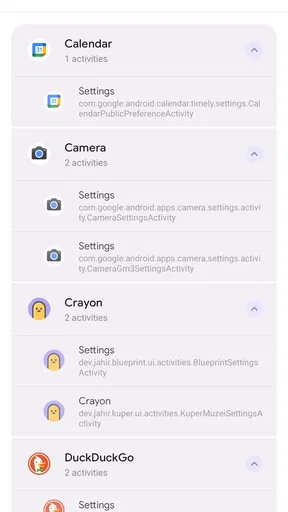
For example, I might place a shortcut to a specific activity in an app on my home screen before a commute. The shortcut can make that destination easier to find, but if the activity needs a connection, its usefulness still depends on the network and the app behind it. That is a sensible expectation to keep in mind when deciding what deserves a permanent place on the screen.
Useful in changing mobile contexts
The strongest use cases are small, repeated detours: opening a particular setting, reaching a less obvious app activity, or keeping a frequently used action within easy reach. I would build shortcuts around moments when I am carrying things, moving between tasks, or trying to finish something quickly, rather than adding one for every feature I might use someday.
A realistic example is getting ready to leave home. If I often adjust a phone setting before heading out, a shortcut can put that destination where I can reach it without hunting through menus. The benefit is modest on any single occasion, but it adds up when the same detour happens repeatedly. I would test each shortcut in the context where I plan to use it, since a useful home-screen arrangement is one that works for my actual routine, not just one that looks tidy.
What happens when a shortcut fails
Shortcuts are pointers to actions, so the destination remains important. If an app changes, an activity is no longer available, or a setting behaves differently on a particular device, the shortcut may not be as dependable as its icon suggests. When one stops working, I would first open the relevant app or setting the usual way to check whether the destination itself is still available. If it is, rebuilding the shortcut is a more useful next step than repeatedly tapping the old one.
This also affects how I organize anything important. I would keep a familiar route available for actions I cannot afford to lose access to, at least until I have used the new shortcut enough to trust it. Shortcut Maker can make navigation more direct, but I would not treat a shortcut as a backup of the app or feature it opens.
Worth Reading Before You Choose

Flipboard Shows What News Apps Must Do Beyond the Feed

Switching to Android Auto Means Rethinking Your Driving Routine

Google Calendar Makes a Crowded Week Easier to Manage

Ludo King Makes the Most of the Minutes Between Plans

Baby Panda World Brings Quick Play to Modern Phones, but Its Game Library Feels Busy

ESPN’s Live Game View Makes Following Close Games Easier
Keeping expectations realistic about data
A shortcut is not the same thing as a copy of the service or content it leads to. If the destination relies on an internet connection, using a shortcut does not remove that dependency. I also avoid drawing conclusions about network or data use from the shortcut icon alone: the destination app or setting determines what happens after I tap it.
That makes this a good fit for people who want a more deliberate phone layout, especially if they already know which app actions they repeat. It is less compelling for someone who rarely changes their home screen or expects a shortcut tool to work around connectivity problems. If you want a destination to load with less effort, this can help; if you want it to load without a connection, this is not the tool I would choose.
So, I recently got my hands on this nifty little app called Shortcut Maker, and let me tell you, it's been quite the game-changer for my daily smartphone routine. If you're the kind of person who loves having everything at your fingertips and organized just the way you like it, you might want to stick around as I dive into what makes this app tick.
Customization Galore
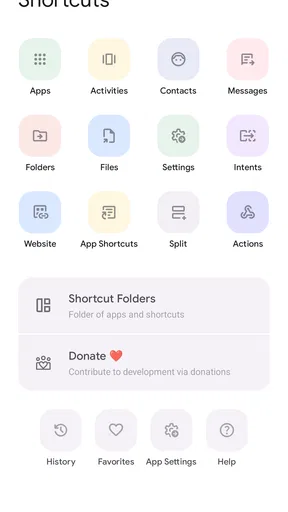
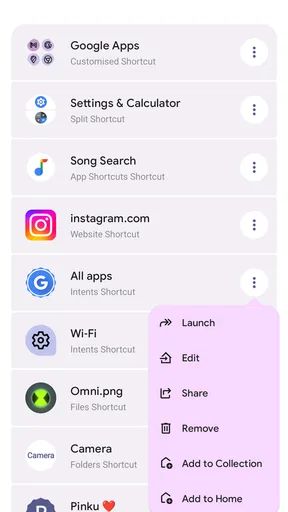
When it comes to customizing your phone, Shortcut Maker is like that friend who knows exactly what you need before you even ask. You can create shortcuts to practically anything—apps, settings, and even specific activities within apps. It’s like turning your phone into a personal assistant without having to deal with actual human interaction. Perfect, right?
Interface and Usability
The interface is pretty straightforward, which is great if you're like me and get overwhelmed by too many options. The app doesn’t try to do too much visually, which is a relief. Instead, it focuses on functionality, and it does it well. The process of creating a shortcut is as simple as selecting the item you want quick access to and customizing it however you see fit.
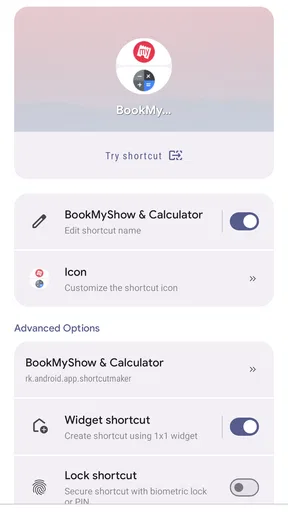
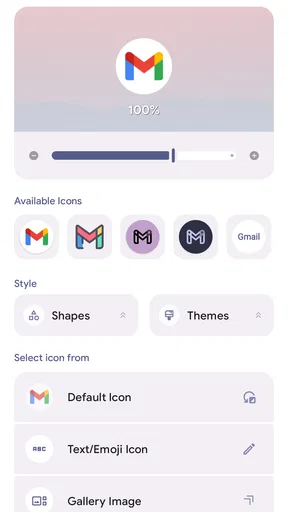
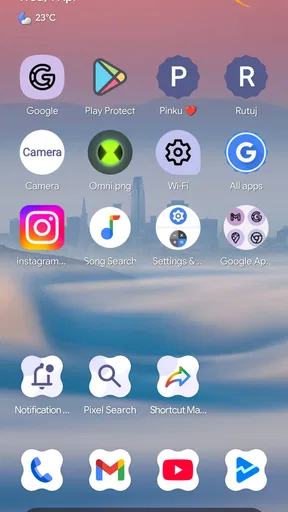
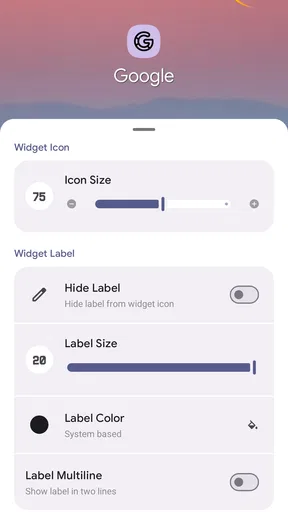
You can choose different icons, labels, and even set specific actions for your shortcuts. The app offers a wide range of icon packs and themes, which is a nice touch for those who like to match their phone's aesthetic. I spent way too much time playing around with this feature, trying to find the perfect look for my home screen.
Performance
Performance-wise, Shortcut Maker is smooth as silk. I didn’t encounter any lag or crashes during my time with it, which is a big plus. It integrates seamlessly with your device, and the shortcuts work instantly. There’s nothing worse than a shortcut app that takes longer to open than the app itself, right?
Another thing I appreciate is that it doesn't hog your phone’s resources. It runs quietly in the background, letting you go about your business without any interruptions. This is especially important if you're juggling multiple tasks and need your phone to keep up with you.
Features That Stand Out
One feature that really stood out to me was the ability to create shortcuts for hidden activities. You know those settings and features buried deep within your apps that you only need occasionally? Well, now you can pull them up with a single tap. It's like having a cheat code for your phone.
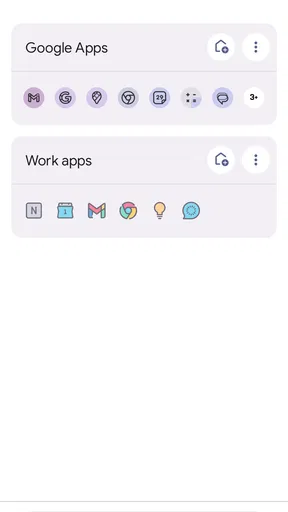
There’s also a feature that lets you create widgets from your shortcuts, which adds another layer of accessibility. I set up a few widgets for my most-used apps, and it’s been a massive time-saver. No more digging through folders or app drawers to find what I need.
Room for Improvement?
While I’m a big fan of the app, there are a couple of things that could be improved. For instance, the initial setup might be a bit daunting for those who aren’t tech-savvy. A more comprehensive tutorial or tips section could help users get the most out of the app from the get-go.
Also, while the app is free, there are a few features that are locked behind a paywall. It’s not a huge deal, but if you’re someone who wants the full package without any limitations, you might have to shell out a few bucks.
Before committing to a large collection of shortcuts, I would start with two or three that remove a repeated detour. Give them clear labels, then use them for a few days before adding more. This simple trial helps reveal whether a shortcut saves time or merely adds another icon to scan. I also prefer labels that describe the action, not just the app name, because the point is to recognize the destination at a glance.
There is a useful trade-off between customization and clarity. A distinctive icon can make an action easier to spot, but heavily styled icons may be harder to recognize than the familiar look of the original app. If I build a shortcut for a less familiar activity, I make its label explicit rather than relying on an icon that only looks attractive. That keeps a personalized screen usable, not just polished.
Who benefits most from the extra control
I would recommend trying it if you already know which actions you repeat and enjoy arranging your phone to suit those habits. It is particularly handy for someone who wants a direct route to a buried setting or a specific activity inside an app. People who prefer a carefully organized home screen may also appreciate being able to choose labels and icons instead of accepting the default layout.
On the other hand, if your launcher already gives you all the shortcuts you need, a separate customization app may add more setup than value. The same is true if you rarely revisit particular settings or are happy to search for apps as needed. I would also skip it if you expect every app to expose every internal action; a shortcut can only be useful when the destination is available to select and works on your device.
Choosing between shortcuts and familiar alternatives
The usual alternative is to open the app drawer, search for an app, or navigate through that app’s own menus. Those routes are dependable because they follow the familiar interface, but they can involve several extra steps. A normal app icon is simpler to maintain, while a shortcut to a specific activity can be more direct when I use that activity often. Widgets can show or surface information in a way an icon does not, but they take up screen space; Shortcut Maker’s shortcut widgets are useful when I want a chosen action to be more prominent.
I would not replace every standard icon with a custom shortcut. Keeping the main apps in their usual places makes the phone easier to use for other people and gives me a fallback when I am in a hurry. A measured layout works better: keep everyday apps familiar, then use custom shortcuts for the handful of destinations that are genuinely awkward to reach.
Cost, compatibility, and what to expect
Shortcut Maker is a free personalization app from developer Rushikesh Kamewar. It is rated for Everyone, has reached over ten million installs, and has an average rating of three out of five from around twenty-three thousand ratings, with about one and a half thousand written reviews. Those figures suggest broad use alongside mixed reactions, so I would approach it as a tool to test against my own needs rather than assume it will suit every phone setup.
The app was released on January 8, 2020, and its current version is 5.0.7; it requires Android 9 or later. Some in-app purchases range from ninety-nine cents to one hundred twenty-nine dollars and ninety-nine cents per item. Since the basic app is free, I would explore the options I actually need before paying for anything, and check what a purchase unlocks in the app itself rather than assuming every customization is included.
A sensible way to try it
My first test would be one low-risk shortcut to an action I already know how to reach manually. I would create it, give it a clear label, and tap it in the circumstances where I would normally need it. If it opens the intended destination consistently, I would add a second or third. If it does not, I would check the destination through its normal route before rebuilding anything, so I know whether the problem is with the shortcut or the underlying app or setting.
That approach also answers the practical question of whether setup is worth the effort. If a shortcut saves a repeated sequence and remains easy to identify, keep it. If it is used rarely, takes too long to configure, or makes the screen more confusing, remove it and return to the regular route. The best setup is not the one with the most custom entries; it is the one that makes the actions I care about easier without creating new clutter.
Overall, Shortcut Maker is a fantastic tool for anyone looking to streamline their smartphone experience. It's like giving your phone a personal touch, making it truly yours. Whether you're a productivity junkie or just someone who likes things neat and tidy, this app is definitely worth checking out.
So, if you're ready to take your phone organization to the next level, give Shortcut Maker a try. You might just find that it becomes as essential to your daily routine as your morning cup of coffee. And who knows, you might even start to wonder how you ever lived without it!
Pros
- User-friendly interface for easy navigation.
- Highly customizable shortcuts options.
- Lightweight with minimal storage usage.
- Compatible with most Android devices.
- Regular updates enhance functionality.
Cons
- Limited features in free version.
- Occasional glitches in widget creation.
- Ads can be intrusive at times.
- Requires permissions that some users may find excessive.
- No iOS version available.
FAQs for Shortcut Maker
What is Shortcut Maker and what does it do?
Shortcut Maker is an app designed to simplify access to your favorite applications, settings, and activities on your device. It allows users to create personalized shortcuts on the home screen for apps, contacts, or system settings, enhancing productivity by reducing the time needed to navigate through your device.
Is Shortcut Maker easy to use for beginners?
Yes, Shortcut Maker is designed with a user-friendly interface that makes it accessible even for beginners. The app provides a step-by-step guide to help users create custom shortcuts with ease. Its intuitive design ensures that even those with limited technical knowledge can make the most of its features.
Does Shortcut Maker require any special permissions?
Shortcut Maker requires certain permissions to function effectively, such as access to your device's apps and settings. These permissions allow the app to create shortcuts and enhance its functionality. Users are prompted to grant these permissions during the initial setup, ensuring transparency and control over their data.
Can I customize the appearance of the shortcuts created with Shortcut Maker?
Yes, Shortcut Maker offers extensive customization options. Users can modify the icons, labels, and overall appearance of the shortcuts to match their personal style or theme. This level of customization allows for a personalized and aesthetically pleasing home screen experience.
Is Shortcut Maker available for both Android and iOS devices?
Shortcut Maker is primarily available for Android devices. Its features are optimized for the Android operating system, where it can effectively manage and create shortcuts. At present, there is no iOS version available, so users with Apple devices may need to look for alternative solutions.


